
KINETA is better known for home chargers, but it also has a public charging network that you use through the KINETA Charge app. Most of it is AC, at hotels, malls and car showrooms, with some DC. KINETA doesn’t publish a single rate card for the whole network, so here’s what we could confirm, how to start a session and who to call when something goes wrong.
Operator at a glance
| Item | Details |
|---|---|
| Operator | KINETA Sdn. Bhd. |
| Network type | Public network, mostly AC destination chargers at hotels, malls and car showrooms, plus some DC. Not every listed site may be open to the public, so check access in the app. KINETA also sells and installs home and business chargers. |
| Network size | In an August 2026 network update, KINETA reported 246 charging points across 74 locations (184 AC, 62 DC). That’s the company’s own figure at that date, not a live count of public bays. It isn’t from the Energy Commission data we use for most other networks. |
| Charger types | AC, for example 22 kW Type 2 at Grand Hyatt Kuala Lumpur. DC at some sites. Top DC power on the public network: Not published. Check connector type and power for each station in the app. |
| App | KINETA Charge (iOS and Android). It replaced the old PlugIT app on 15 May 2024. |
| Roaming | KINETA has announced partnerships with Charge+ (2025, including cross-platform roaming) and chargEV. We couldn’t confirm which KINETA chargers can be started from partner apps today, so use KINETA Charge and check each station’s activation and payment options. |
| Website | kinetacharge.com/my |
| Customer support | 03-7622 9999, kineta@sime.com, or the Support section in the app. Office hours are Monday to Friday, 8.30am to 5.30pm. |
| Office address | M2-8-3A, Tower 2, Level 8, Sime Darby Motors City, No. 6, Jalan PJU 1A/7, Ara Damansara, 47301 Petaling Jaya, Selangor |
KINETA charging rates
| Charger type | What we know | Idle fee | Notes |
|---|---|---|---|
| AC | No public rate card found. Prices may vary by station. | Not published. The app can list an idle fee for each charger. | Shown per charger in the app before you start. |
| DC | No public rate card found. Prices may vary by station. | Not published | Shown per charger in the app before you start. |
KINETA doesn’t publish a network-wide rate card. Check the price for your charger in the KINETA Charge app before charging.
Charging at a mall or hotel? Parking may be charged on top of the charging price, so check the car park rates too. Know the rate already? Plug it into our EV charging cost calculator.
How to start a charging session with KINETA
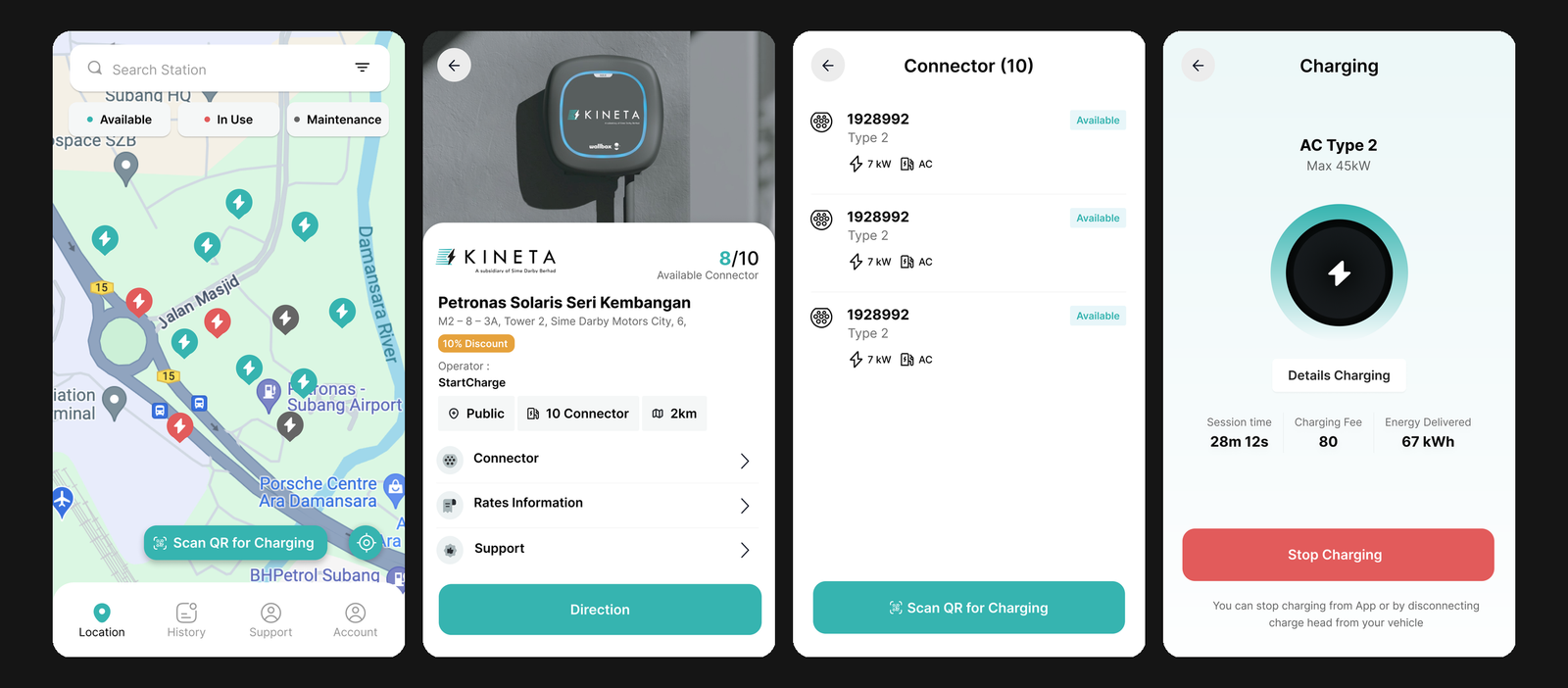
The KINETA Charge app, which you use to find chargers, scan to start and track your charging session.
The KINETA Charge app is the standard way to find chargers, add a payment method and manage sessions. KINETA has also advertised QR payment with TNG eWallet or a card at selected sites. Follow the instructions shown at the charger, because the QR payment steps may differ by site.

- Download KINETA Charge and sign up with your full name and email. KINETA sends a one-time passcode to your email to finish registration.
- Add a credit or debit card. Not every card works, and the app shows an error if yours isn’t accepted.
- Find a station on the map. Status indicators show which chargers are free, and the station panel lists the connectors.
- At the charger, follow its displayed instructions. Where QR payment is offered, use it and follow the payment prompts. Otherwise, start the session in the KINETA Charge app.
- Stop the session in the app when you’re done, then unplug and move the car. The app keeps a summary of each session, and an e-invoice goes to your email.
Problem with a session? KINETA’s terms encourage you to contact Support in the app within 24 hours of the transaction. You can also call 03-7622 9999 on weekdays.
Payment and fees
| Method | Details |
|---|---|
| Debit or credit card | Linked in the app and charged for each session |
| TNG eWallet | In August 2026, KINETA advertised QR payment with TNG eWallet or a card at The Gardens Mall KL, EQ Kuala Lumpur, Grand Hyatt Kuala Lumpur and The Saujana Hotel Kuala Lumpur. Availability may have changed, so check at the charger. |
| Card verification or session hold | Not published |
| Idle fee | Not published network-wide. The app can show an idle fee per charger, so check before you leave the car. |
| Refunds and disputes | KINETA’s app terms say you aren’t entitled to a refund for charging payments. For billing or charging questions, the terms encourage you to contact Support in the app within 24 hours of the transaction. |
| Subscription | No membership plan published |
Pros and cons
| Pros | Cons |
|---|---|
| AC chargers at central KL hotels and malls | No public network-wide rate card |
| QR payment with TNG eWallet advertised at some sites | Much smaller network than the big players |
| Up to 22 kW AC at some sites | 62 DC points in KINETA’s August 2026 figure, so check road-trip stops in the app |
| Phone and email support from KINETA’s own team | Office lines are weekdays only |
Where to find KINETA charging stations
KINETA has named public sites like The Gardens Mall KL, EQ Kuala Lumpur, Grand Hyatt Kuala Lumpur, The Saujana Hotel Kuala Lumpur and KLGCC. For the full list, live status and access rules, use the map in the KINETA Charge app.
Visit KINETA’s website Compare all charging networks
Our take
This section is EVCharge Malaysia’s opinion, not an official position from KINETA.
KINETA is a destination network. About three quarters of its reported points are AC, so it works best when you’re parked for a few hours anyway, like a hotel stay, a long lunch or a mall trip. For highway charging, keep another app on your phone.
The missing rate card is the weak spot. Open the app every time before you plug in, and remember mall parking may come on top. Don’t plan a budget around an old screenshot or a figure you saw online.
Where QR payment is offered, it’s handy if you’d rather not save a card in yet another app. Want to see how KINETA compares? Check our charging networks hub or run your numbers in the charging cost calculator.
FAQ
How much does KINETA charging cost?
KINETA doesn’t publish a single rate card for its network. Prices can vary by station, and the app shows the price for each charger before you start.
How many KINETA charging stations are there?
In an August 2026 update, KINETA reported 246 charging points across 74 locations, with 184 AC and 62 DC. Check the app for current sites and access.
Can I pay for KINETA charging with Touch ’n Go eWallet?
At selected sites, according to KINETA. In August 2026 it advertised QR payment with TNG eWallet or a card at The Gardens Mall KL, EQ Kuala Lumpur, Grand Hyatt Kuala Lumpur and The Saujana Hotel Kuala Lumpur. Availability may have changed, so follow the instructions at the charger.
Does KINETA charge idle fees?
KINETA doesn’t publish a network-wide idle fee. The app can show one for each charger, so check before you leave the car.
What happened to the PlugIT app?
KINETA phased it out on 15 May 2024. Use the KINETA Charge app instead.
How do I contact KINETA?
Call 03-7622 9999, email kineta@sime.com, or use Support in the app. Office hours are Monday to Friday, 8.30am to 5.30pm.
Reviewed on 16 November 2026 against KINETA’s own pages and announcements. Prices, station availability and payment options can change, so check the KINETA Charge app. Spotted a change? Email admin@evcharge.my.